The pool is the most photographed amenity of a small hotel or B&B — and the hardest door to manage. It is for guests only, it has fixed opening hours, and there is almost never anyone standing next to it: the front desk closes in the evening, and in a family-run guesthouse the owners are cooking breakfast, not guarding a gate. So most small properties end up at one of two extremes: a pool gate propped open all day, with anyone free to wander in, or a key "available at reception" — with guests queueing at 9 a.m. and the key missing by dinner.
Hotel pool access control does not have to mean turnstiles, RFID wristbands or resort software. For a small property, all it takes is a credential that is born with the right limits built in. A wireless keypad like 1Control PAD gives each guest a time-window PIN: valid only during pool opening hours, only on the right days, and only for the dates of the stay. Outside that window, the code simply does not open the gate. This guide covers how to set it up, what you need on the gate itself, and when it makes sense to step up to a multi-door system with an access log.
A guests-only pool: why it is the hardest door on the property
Unlike the front entrance, the pool stacks three constraints onto a single gate:
- Guests only: anyone not staying with you should stay out — the passer-by from the road, the neighbour's teenagers, last summer's guest who "knows the place". With the gate propped open, there is no perimeter at all.
- Opening hours only: outside hours the pool is unsupervised, water treatment and maintenance happen, and a midnight swim is a risk (and a noise complaint) no host wants.
- For the length of the stay only: a key lent at check-in should come back at check-out — and copies never come back.
Large hotels solve this with the room keycard wired into the property management system. A six-room B&B or a small country hotel has neither that system nor a person to spare for the gate. What it needs is a way to put the rules inside the credential, rather than a person beside the door.
Turnstiles, RFID wristbands and booking apps: resort-scale answers
Search for "pool access control" and almost everything you find is built for public pools, holiday parks and resorts: full-height turnstiles, RFID wristbands to hand out and top up, booking apps with time slots and capacity limits. In those contexts they make sense — thousands of entries, a ticket office, dedicated staff.
For a property with ten or twenty rooms they are oversized on every axis: a turnstile needs building work and space a poolside rarely has; wristbands have to be issued, explained, collected and re-ordered; booking apps add a subscription and ask every guest to install something just to take a swim. And none of them start from the small operator's actual question, which is disarmingly simple: who may enter (guests only), when (during opening hours), for how long (the length of the stay).
Manage access to your facility
1Control ACCESS centralises openings, permissions and logs for every entrance: hardware with a data SIM included for 3 years and dedicated support.
- 1,500+ reviews on Amazon, Facebook and Trustpilot
- Secure payments
- 2-year warranty
The time-window PIN: right-sized for a small property
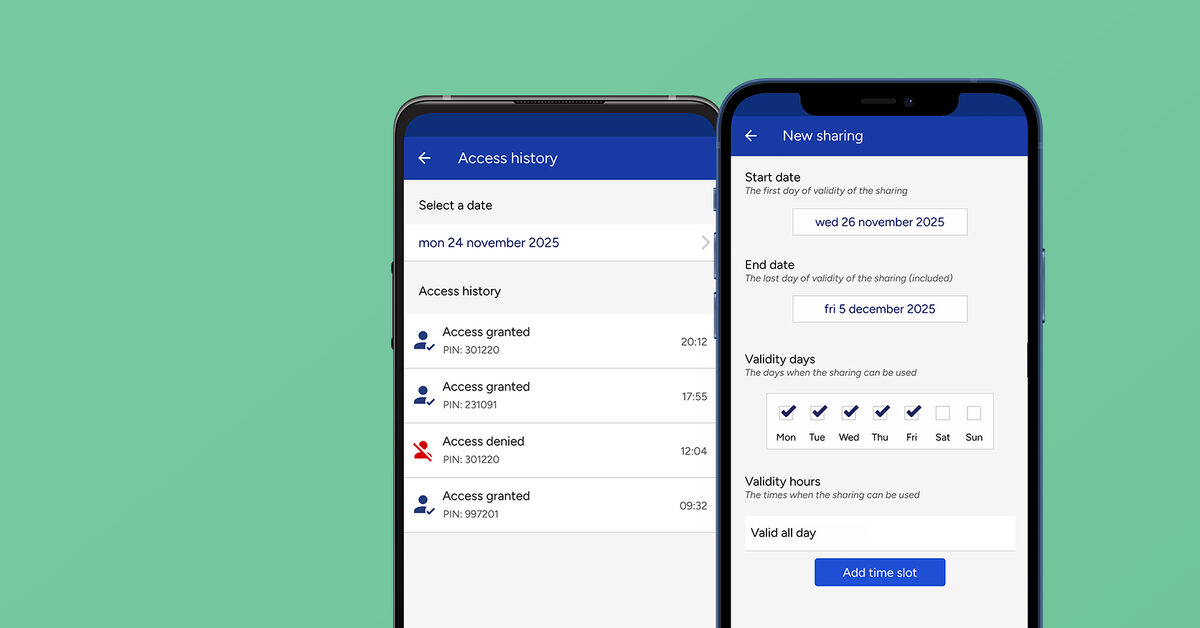
A wireless PIN keypad answers exactly those three questions. PAD mounts next to the pool gate with no building work and no network cabling, runs on batteries and checks codes entirely on its own: no Wi-Fi at the poolside, no SIM card. Each 6-digit PIN is created from the app with its own complete set of time rules:
- Start and end dates: the guest's PIN runs from check-in day to check-out day, then expires on its own;
- Days of the week: handy for contractors — the pool technician on Mondays only, the cleaner on the agreed days;
- Time windows: pool open 9 a.m. to 7 p.m.? The code opens from 9 to 7. At 7:01 p.m. the gate stays shut — no arguments, no ignored signs.
A concrete example: the guests in room 4 are staying from 12 to 19 July. At check-in they get their PIN, valid only on those dates and only during opening hours. All week they come and go on their own; at check-out the code dies by itself — no keys to chase, no "historic" codes still floating around. Each PIN is also tied to a single automation: the pool code opens the pool gate, not the garage or the storeroom.
One point worth stating plainly, on the number of codes: PAD includes 4 PINs, expandable with a one-off upgrade up to 1000 — if you plan on one code per room or per booking, factor that in from the start. App shares by phone number, on the other hand, are free: the natural option for you, your family and permanent staff, who rarely touch the keypad because they open from their phones.

Pool gate, spa and gym doors: the hardware side
The keypad commands the gate by radio, so the next question is: what is on the gate today? Three scenarios cover nearly every property:
- The gate already has an automation with a remote control (a motorised gate, a door with a radio receiver): PAD copies the existing remote's signal — compatibility covers 800+ models — and nothing on the installation is touched.
- The gate only has an electric strike, with no radio receiver: add SOLO KIT, a receiver wired to the strike's contact, which gives the gate a radio channel the keypad and the app can command.
- Interior doors — spa, wellness room, gym — with a euro-cylinder lock: there the answer is a smart lock like DORY, which keeps a mechanical key as backup and is managed with the same time-window shares.
All three are retrofit moves: you work with what is already there, without rewiring the property — the same no-building-work philosophy behind an access-first smart home setup for rentals.
When you need more: multi-door control and a log with ACCESS
There is a point where a keypad alone stops being enough: a property with several doors to coordinate — pool, spa, gym, car park, night entrance — or the need to know who entered and when, with a personal credential per guest. That is the territory of 1Control ACCESS: users created from a web admin area with validity dates and time windows, instant remote revocation, a per-user, per-door access log, and every door managed from one dashboard. Retrofit is the rule here too — 12 VDC power and a dry contact on the existing automations — and there is no software subscription: the LTE SIM is included, with 3 years of connectivity already covered.
The logic is the same as any space that lives on bookings and opening hours: if you also rent out rooms for courses or events, you will find it applied step by step in our guide to time-limited access for rented rooms.
Campsites and holiday parks: pool, entrance barrier, shower blocks and motorhome pitches
On a campsite the same problem multiplies: guests change every day, the entrances are spread over several hectares, and reception closes in the evening while the site stays occupied all night. The principle does not change: every credential is created with the dates of the stay and the hours of the service, and switches itself off at departure. Entrance by entrance:
- The pool: the time-window PIN described above, valid from arrival to departure and only during pool hours. With hundreds of pitches, plan for the extra PAD PINs from the start, or manage the pool gate from ACCESS as well, with its smart keypad.
- The entrance barrier or gate: the busiest entrance on the site. 1Control ACCESS connects to the motor of the barrier you already have: guests drive in with the app, with a PIN or a badge on the smart keypad, with a WHY remote assigned to their name, or with their number plate read by the camera. Every method follows the same rules and expires on the departure date, so a remote that never came back simply stops opening.
- Quiet hours: with scheduled openings the barrier can stay open during arrival hours, if the operator supports hold-open, and close again in the evening. From then on only valid credentials open it; guests who arrive after reception has closed, you let in remotely from the app or the web admin area.
- Shower blocks, laundry, barbecue area: if the door has an electric strike or lock, it is controlled like any other entrance (with ACCESS, or with PAD and SOLO KIT) and stays reserved for guests, at night too.
- Motorhome pitches: the motorhome's number plate, read by the camera, lifts the barrier only for the days of the stay.
- Seasonal staff: entertainers, lifeguards and cleaning teams get access that expires at the end of the season, only on the entrances each of them needs.
Two details matter more on a campsite than anywhere else. The network, first: ACCESS has an LTE SIM included, with 3 years of connectivity, and needs no Wi-Fi at the barrier; if the connection drops, the permissions stay stored in the device and authorised people keep getting in. The log, second: at the end of the day you see who came through, at which entrance and with which method, and the closing sensor tells you whether a gate was left open. Credentials are created in the web admin area, so do not assume an automatic link with your booking software.
Rules and safety: what access control does not do
One necessary clarification: controlling the gate helps you enforce the pool rules — it does not replace them. Requirements around supervision, capacity, signage and hygiene depend on local regulations and on the type of property, and they vary from country to country: check them with your advisor or the competent local authority. What the time-window PIN guarantees is the precondition for everything else: nobody gets in out of hours or without a right to be there — and the closed window becomes protected time for maintenance and water treatment, ideally with its own recurring PIN for the technician.
Frequently asked questions
Can a guest enter the pool outside opening hours with their PIN?
No: every PIN has its own time windows, and outside them the gate does not open even with the correct code. The pool's opening hours become a rule enforced by the gate itself, not a sign you hope people read.
How many PINs can I create with PAD?
PAD includes 4 PINs, expandable with a one-off upgrade up to 1000. App shares by phone number — the natural route for family and staff — are free.
Do I need Wi-Fi at the poolside?
No: PAD works over Bluetooth, runs on batteries and verifies PINs on its own. Internet only matters if you want to create or revoke codes remotely: in that case you add the LINK hub, placed indoors within Bluetooth range of the keypad.
How do I handle the pool technician?
With a recurring PIN restricted to days and hours: Mondays from 7 to 9 a.m., for example, before the pool opens to guests. If the contract ends, you revoke that single code from the app without touching any other.
I have a pool, a spa and a gym: is one keypad enough?
Each PAD PIN is tied to a single automation, so with a few doors you can work with dedicated keypads and codes. If the doors multiply or you need a per-user log, the right step is a centralised system like 1Control ACCESS, with every door in one web area.
Does this work for a campsite too?
Yes, with ACCESS. Time-window PINs are enough for the pool; the entrance barrier, shower blocks and motorhome pitches need a multi-entrance system: app, PIN and badge on the smart keypad, WHY remotes and number plates read by the camera. Every credential expires on the departure date and every entry is logged.
Does access control replace supervision or lifeguard duties?
No. Supervision, capacity and safety requirements depend on local regulations and on your type of property: access control limits entry to the right people at the right times, but your management obligations should be checked with your advisor.
Conclusion
For a small hotel or B&B, pool access control is not a resort project: it is a wireless keypad on the gate and one simple rule — one PIN per guest, valid only during opening hours and only for the dates of the stay. No keys to chase, no propped-open gate, no arguments at seven in the evening: the gate enforces the rules by itself, and you get back to looking after guests.
If you are building out the rest of your setup, start with our access-first smart home guide for rentals. And to see time-window PINs and access logs on your own doors, discover 1Control PAD or request an ACCESS demo.