In short. A garage door, a gate or a front door does not become compatible with Alexa because of the brand of its motor or lock: you need a device that receives the command from the skill and turns it into an opening. With 1Control, the garage door and the gate use SOLO, which copies your existing remote, the front door uses DORY, and both need LINK, the bridge between the internet and the devices. Then you enable the 1Control skill in the Alexa app.
- You keep your motor: SOLO is not wired to the control board.
- No LINK, no Alexa: SOLO and DORY on their own open from the app over Bluetooth, close by.
- Start by checking the model of your remote, not the brand of your door.
Search for "Alexa compatible devices" and you mostly find bulbs, plugs and speakers. For a garage door or a front door the question is different: you do not just need something that "talks" to Alexa, you need something that operates an existing automation reliably and under control. This guide sets out the options, what you need with 1Control, what is not compatible and how to stay in control of who can open.
What "Alexa compatible" means for a garage door, gate or front door
Alexa does not drive a motor directly. It recognises the phrase, passes it to the maker's skill, and the skill sends the command to an internet-connected device that carries it out. A garage door is "Alexa compatible" when that whole chain exists. There are three ways to build it:
- The motor maker's own Wi-Fi module. Some brands sell a module with their own app and integration. It works with that brand and usually has to be fitted inside the control board.
- A generic Wi-Fi relay wired to the push-button contact of the control board. This is the DIY route: you have to open the control board, you need Wi-Fi all the way to the door, and in Alexa the door shows up as an ordinary switch.
- A device that repeats the signal of your remote, without touching the installation. This is how SOLO works: it copies the remote you already use and transmits it when asked.
The third route is the only one that does not depend on the brand of the motor and that you can use where the control board is not yours, such as a shared gate. Its limit is a different one: your remote has to be one that SOLO can copy.
Alexa compatible garage door and gate: SOLO + LINK
For a garage door, a driveway gate, a pedestrian gate or a barrier you need two devices.
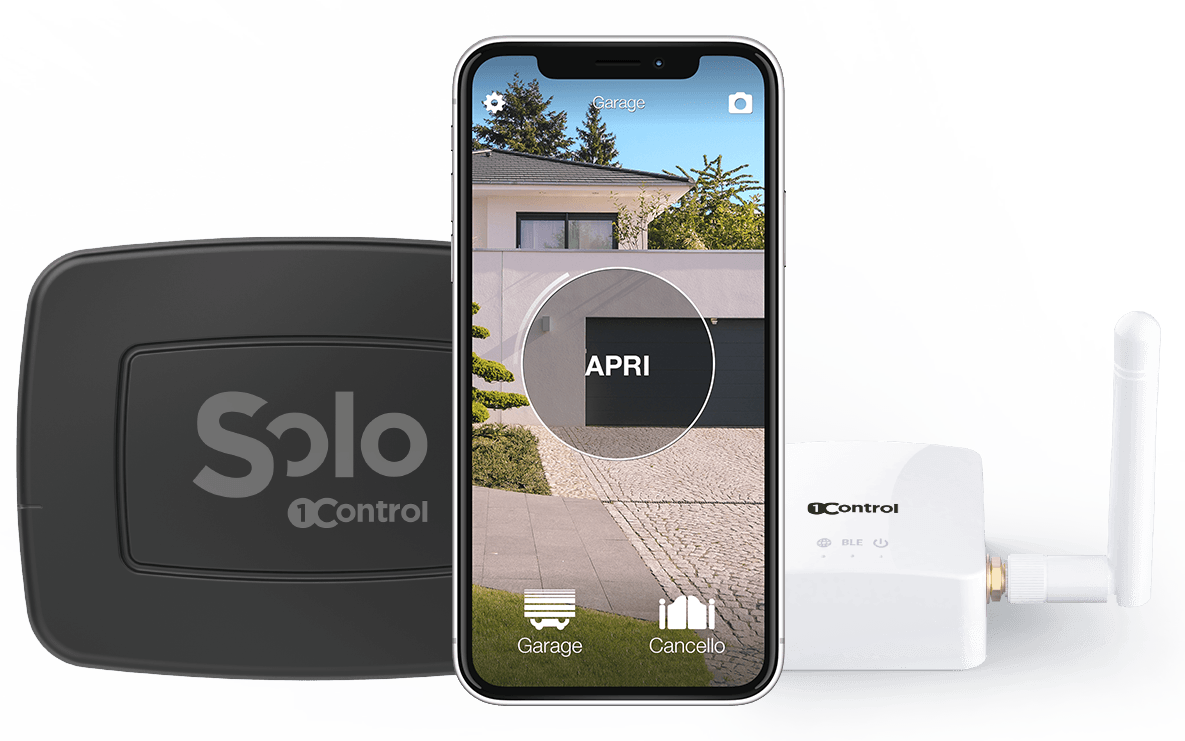
- 1Control SOLO sits near the automation, runs on batteries and is not connected to the control board. It copies the signal of your remote with a guided procedure in the 1Control app and, in the standard version, controls up to four automations, even of different brands. It works with more than 800 remote models, fixed code and rolling code: check yours on the SOLO compatibility page.
- 1Control LINK stays indoors, connected to the router over 2.4 GHz Wi-Fi or an Ethernet cable, and talks to SOLO over Bluetooth. It receives the skill's commands from the internet and passes them to SOLO.
Your original remote keeps working: SOLO is one more way to open. An Alexa command is the same as pressing the copied button, so the door does exactly what it would do with the remote.
Open even when you are away: SOLO + LINK
SOLO copies your compatible remote and opens from your phone; LINK connects it to the internet over 2.4 GHz Wi-Fi or Ethernet, so you can open from anywhere. Check your remote model first. One-off purchase, no subscription.
228,00€ 179,00€ VAT included
- 1,500+ reviews on Amazon, Facebook and Trustpilot
- Secure payments
- 2-year warranty
Alexa compatible front door: DORY + LINK
For the front door the device is different. 1Control DORY is a smart lock that replaces the euro cylinder of the door: no drilling and no new lock, you only swap the cylinder. It opens from the app over Bluetooth and with a traditional mechanical key, which works even when the batteries are flat.
With LINK in range, the same 1Control skill that opens the garage door also controls DORY. One LINK handles up to five 1Control devices, so SOLO at the garage and DORY at the front door can share the same LINK, as long as both are within Bluetooth range.
Before buying, check that your door has a suitable euro cylinder with the DORY compatibility check. The differences between smart locks are covered in our smart lock guide.
Everything you need, device by device
| What | What it does | Needed for Alexa? |
|---|---|---|
| SOLO | Copies the remote of your garage door, gate or barrier | Yes, for garage door and gate |
| DORY | Replaces the cylinder of your front door | Yes, for the front door |
| LINK | Connects SOLO and DORY to the internet | Always |
| 1Control skill | Carries commands from Alexa to your 1Control account | Always |
| Echo or Alexa app | Listens to the phrase | Always |
Three installation details decide whether the system will be reliable:
- Distance between LINK and SOLO (or DORY): around 25 metres in a straight line, much less with walls, reinforced concrete or metal in between. If the garage is far away, LINK's optional external antenna helps (it serves both Bluetooth and Wi-Fi), or a closer spot reached with an Ethernet cable.
- Network: 2.4 GHz Wi-Fi (5 GHz-only networks will not do) or Ethernet. LINK has no SIM card.
- Placement: LINK stays indoors, as it is not weatherproof.
How to link the 1Control skill to Alexa
Start from the 1Control app, not from Alexa. Voice control is a layer on top of remote opening: if that does not work, Alexa will not work either.
- Test remote opening with the horizontal slider in the 1Control app: the garage door or front door should open even when you are away.
- Enable the 1Control skill in the Alexa app and sign in with your 1Control account.
- Discover devices: the doors managed by SOLO and DORY appear in your list of Alexa devices, under Devices in the Alexa app.
- Give each door a short, distinct name, different from your lights.
- Try the phrase on an Echo or in the Alexa app on your phone.
Menu names change between versions of the Alexa app: the steps with screenshots are in the official 1Control guide for Alexa. For everyday phrases and routines, see the Alexa commands worth using at home.
What is not compatible
Better to know before you buy:
- Apple HomeKit and IFTTT: LINK is not compatible. On iPhone, voice control goes through Siri and the Shortcuts app, which work with SOLO and DORY.
- SOLO AUTO: it lives in the car and does not pair with LINK, so it does not respond to Alexa. It is designed for opening from CarPlay and Android Auto.
- Automatic opening on arrival: the 1Control app does not track your location, so the door does not open by itself as you approach. You open it, by voice, from the app or from the car.
- Remotes that cannot be copied: if your remote is not among the compatible ones, SOLO cannot repeat it. The compatibility check tells you before you buy.
Alexa or Google Home: same devices
SOLO, DORY and LINK work with both assistants. Only the integration changes: with Alexa you enable the 1Control skill, with Google Home you link the 1Control service in the Google Home app. If you have both an Echo and a Google speaker that still runs Google Assistant at home, the same door answers to both; with Gemini for Home the command does not get through. The Google version is explained in Hey Google, open the garage door, and both assistants are compared in voice assistants and gates.
Security: who can open by voice
A gate onto the street or your front door is not a light bulb. Three precautions:
- Voice code: in the Alexa app, check the confirmation options for doors and locks, such as a voice code, so that not everyone near the Echo can open.
- Routines: keep the door out of general routines such as "goodnight" or "turn everything off".
- Permissions: in the 1Control app the administrator decides who can open, with shares tied to a phone number, a start date, an expiry date and time slots. Every opening is kept in the history, and revoking access takes effect immediately.
Frequently asked questions
Which devices make a garage door opener compatible with Alexa?
1Control SOLO, which copies the remote of your garage door or gate, paired with 1Control LINK, which connects it to the internet. With the 1Control skill enabled in the Alexa app, the door opens by voice without changing the motor.
Does my garage door motor need to be Alexa compatible?
No. With SOLO what matters is the remote, not the motor: SOLO repeats its radio signal. Check your remote model on the SOLO compatibility page.
How do I see my garage door in my list of Alexa devices?
Enable the 1Control skill in the Alexa app, sign in with your 1Control account and run device discovery. The doors managed by SOLO and DORY then appear under Devices in the Alexa app.
Do I need LINK to use Alexa?
Yes. SOLO and DORY on their own open locally over Bluetooth from the 1Control app. For Alexa, Google Home and remote opening you need LINK, connected over 2.4 GHz Wi-Fi or Ethernet.
Can Alexa open my front door as well?
Yes, with the 1Control DORY smart lock and LINK, through the same skill. DORY replaces the euro cylinder and also opens with its mechanical key. Check your door's compatibility first.
Will my original remotes keep working?
Yes. SOLO copies the signal without disabling the original remotes, which keep working alongside the app and Alexa.
The bottom line
To make a garage door, a gate or a front door compatible with Alexa you do not need a new automation: you need a device that carries out the command (SOLO for the garage door and gate, DORY for the front door) and LINK, which connects it to the internet and the 1Control skill. The first step is always the same: check that your remote is compatible.
For the bigger picture without voice, read how to make your gate and door smart without installation.