To complete the copy follow the procedure as indicated
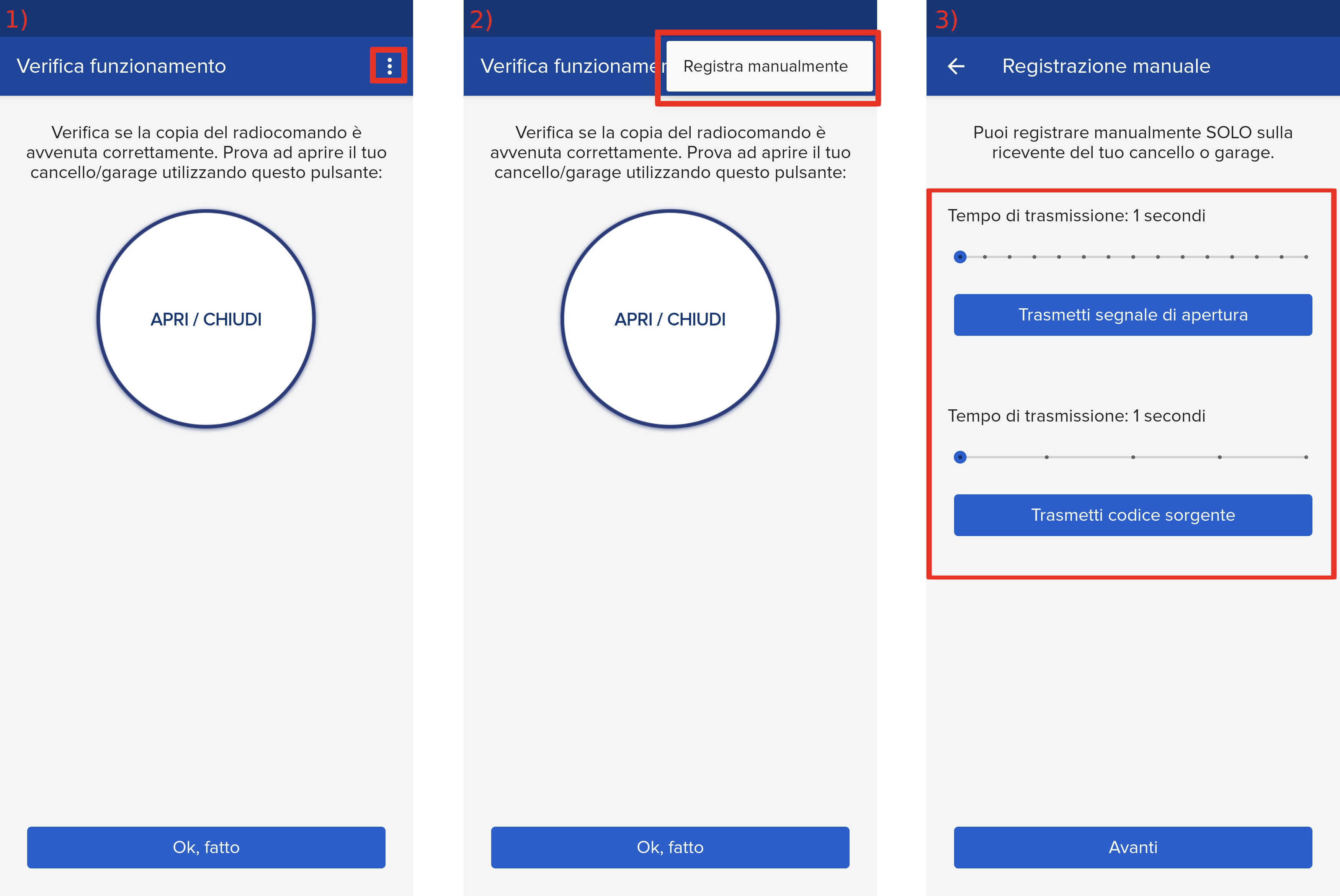
- Start copying until you reach the "Check Operation" screen.
- Press the menu button at the top right to enter manual recording as shown in the image below
- Move both sliders shown to 1 second
- Locate the 3 buttons used for menu navigation: " + " , " - " And " OK "

- Press the " OK " button, if "Param" does not appear on the display, press " OK " again
- Use the " + " and " -" buttons to navigate to the " Radio " item and press " OK ".
- Use the " + " and " -" buttons to get to the " Add start " item and press " OK ".
- The message " Hidden button " will appear on the control unit. In the 1Control app, press the " Transmit source code " button.
When the message " Desired key" appears on the control unit, press the " Transmit opening signal " button on the app
Wait about a couple of minutes, in the 1Control app press the " Next " button at the bottom and continue with the opening test