To complete the copy follow the procedure as indicated
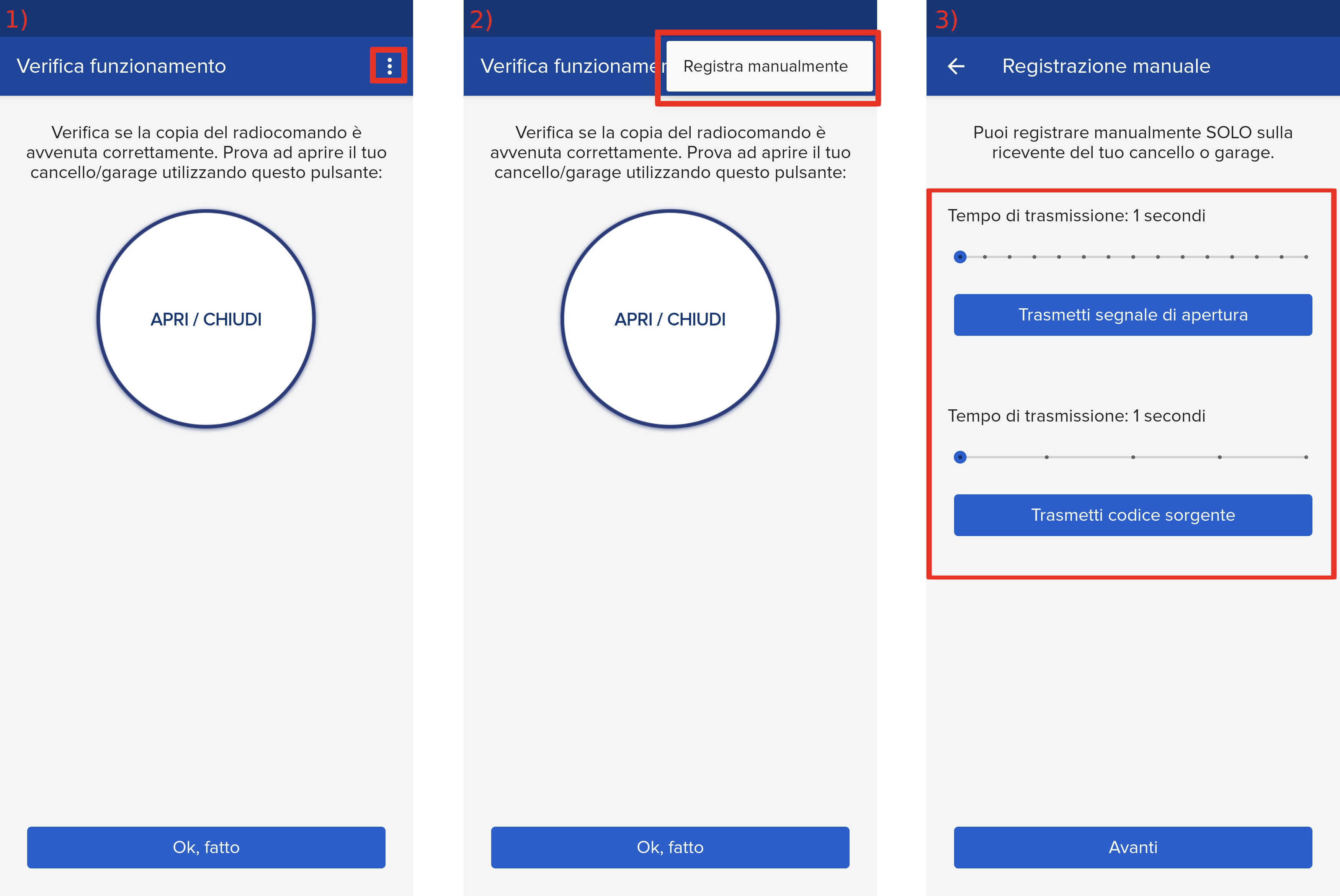
- Start copying until the " Verify Operation " screen appears.
- Press the three dots at the top right to enter manual recording mode
- Move both sliders to 5 seconds
- Locate the " + ", " - " and " OK " buttons on the control unit:

- On the control unit press the " OK " button and the display will show the words " PARAM "
- Press the " - " button until the " RADIO " item appears
- Press " OK " and " add.Start " will be displayed, press " OK " again
- The display shows the words " hidden button "
- In the app press the " Transmit source code " button and wait 6 seconds
- The display will show "Release" , wait for the signal processing to finish
- The display shows the words " desired key "
- In the app press the "Transmit opening signal " button and wait 6 seconds
- The control unit display should read " OK " followed by a number.
- Wait approximately 30 seconds for the control unit to exit programming mode.
- In the app press " Next " at the bottom
- Perform an opening test using the " Open/Close" button