To complete the copy of the radio control, follow the following procedure while standing near the automation:
1) Start copying until the "Check operation" screen
2) Press the menu button at the top right to enter manual recording as in the image below
3) Move the slider above 5 seconds

4) On the control unit, press and immediately release the RADIO button (indicated in red), the LR LED (indicated in green) should flash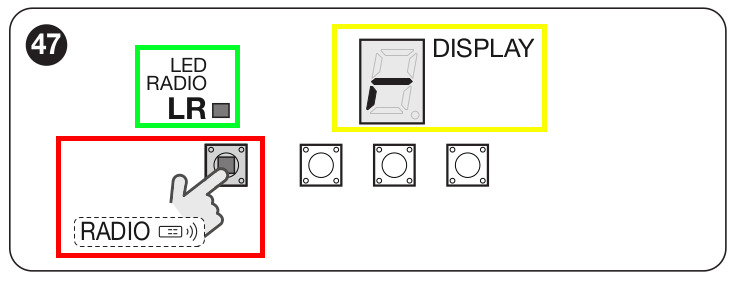
5) Press " Send opening signal " in the app.
6) The display (indicated in yellow) shows the following symbol to indicate the success of the copy

To memorize a second button with a different opening mode, press the RADIO button in point 4 as many times as required by the desired mode and the LED must flash a number of times equal to this value; the values are indicated in the following table:
| Opening command | Number of button presses |
| Step-by-step opening | 1 |
| Partial opening | 2 |
| Opening | 3 |
| Closure | 4 |