To complete the copy, follow the procedure as indicated
- Start copying until the "Check operation" screen
- Press the menu button at the top right to enter manual recording as in the image below
- Move the slider higher than 4 seconds

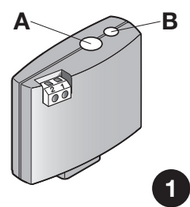
- On the control unit, hold down the learning button ( A in the image) of the receiver until the LED next to it ( B in the image) lights up green, at which point release the button
On the app, press the Transmit opening signal button
The LED should flash 3 green times to confirm the save.
The manual procedure requires you to hold down until the first of the 3 green flashes, so if the 3 seconds selected are too long or too short, adapt the timing accordingly by trying the procedure again from step 3 onwards.
Once the long transmission has been carried out, you can return the selector to 1 second and check that by pressing Transmit opening signal the gate opens.