To complete the copy of the radio control, follow the following procedure while standing near the automation:
1) Start copying until the "Check operation" screen
2) Press the menu button at the top right to enter manual recording as in the image below
3) Move the slider above 5 seconds

4) Press the "radio" button on the receiving control unit for 4 seconds
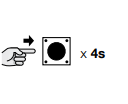
5) By releasing the radio button the LED starts to flash indicating that signal storage has been activated
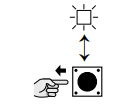
6) Press the "send opening signal" button on the app
7) The three LEDs will flash to confirm that the signal has been copied.