To complete the copy of the radio control, follow the following procedure while standing near the automation:
- Start copying until the " Check operation " screen
- Press the menu button at the top right to enter manual recording as in the image below
- Move the slider higher than 10 seconds

- On the control unit, move the " PROG " switch (highlighted in green) to position 1, to the left
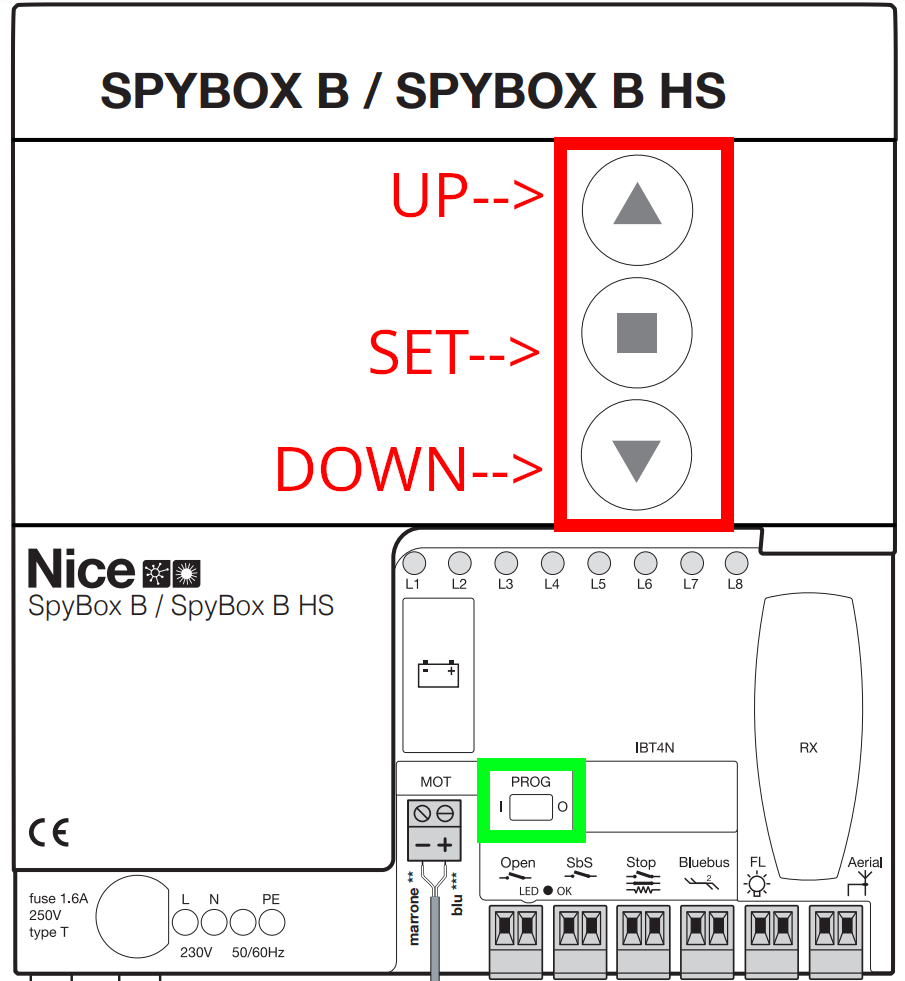
- Hold down the " SET " button for about 3 seconds, until the " L1 " LED flashes, release the " SET " button
- Using the " UP " and " DOWN " keys select the " L8 " LED
- Press and hold the " SET " button for about 3 seconds, all LEDs should flash, do not release the " SET " button
- Using the " UP " and " DOWN " keys select the " L2 " LED
- Release the " SET " button
- In the 1Control app, press the " Send opening signal " button
- Wait 15 seconds, on the control unit move the " PROG " switch to position 0 (to the right)
- In the app, press the " Next " button
- Using the " Open/Close " button, check the opening
If the garage does not operate, repeat the procedure.