To complete the copy follow the procedure as indicated
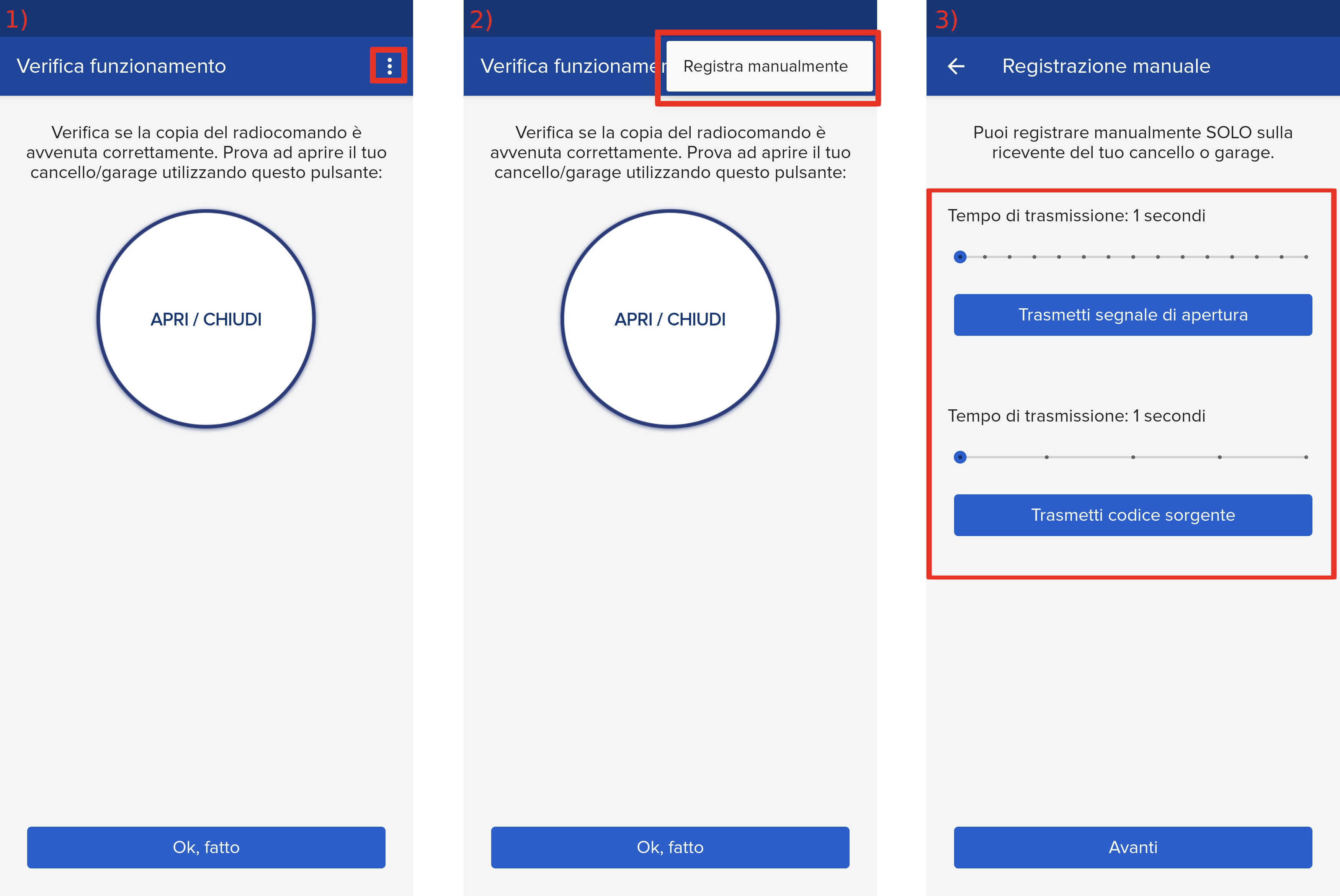
- Start copying until you get to the "Verify Operation" screen
- Press the menu button on the top right to enter manual recording as in the image below
- Move the SOLO as close as possible to the control unit.
- Move both sliders to 6 seconds.
- Wait until the garage/gate is completely closed.
- Press the "Transmit Source Code" button and wait 4 seconds.
- Press the OPEN A button for one second.
- The LED corresponding to OPEN A starts flashing for 5 seconds.
- Within these 5 seconds, while the remote control LED is still flashing, press the "Transmit opening signal" button.
- The LED on the card will light up steadily for 1 second and then turn off, indicating that the memory has been saved.
- Press the "Next" button, and press the open button twice.
- If this doesn't work, repeat the procedure by setting both sliders to 8 seconds and repeat the operation.