- Start copying until the "Check operation" screen
- Press the menu button at the top right to enter manual recording as in the image below
- Move the slider higher than 4 seconds

- Locate the display and the " <-- " keys on the board. " PROG/OK ¨ and " --> "
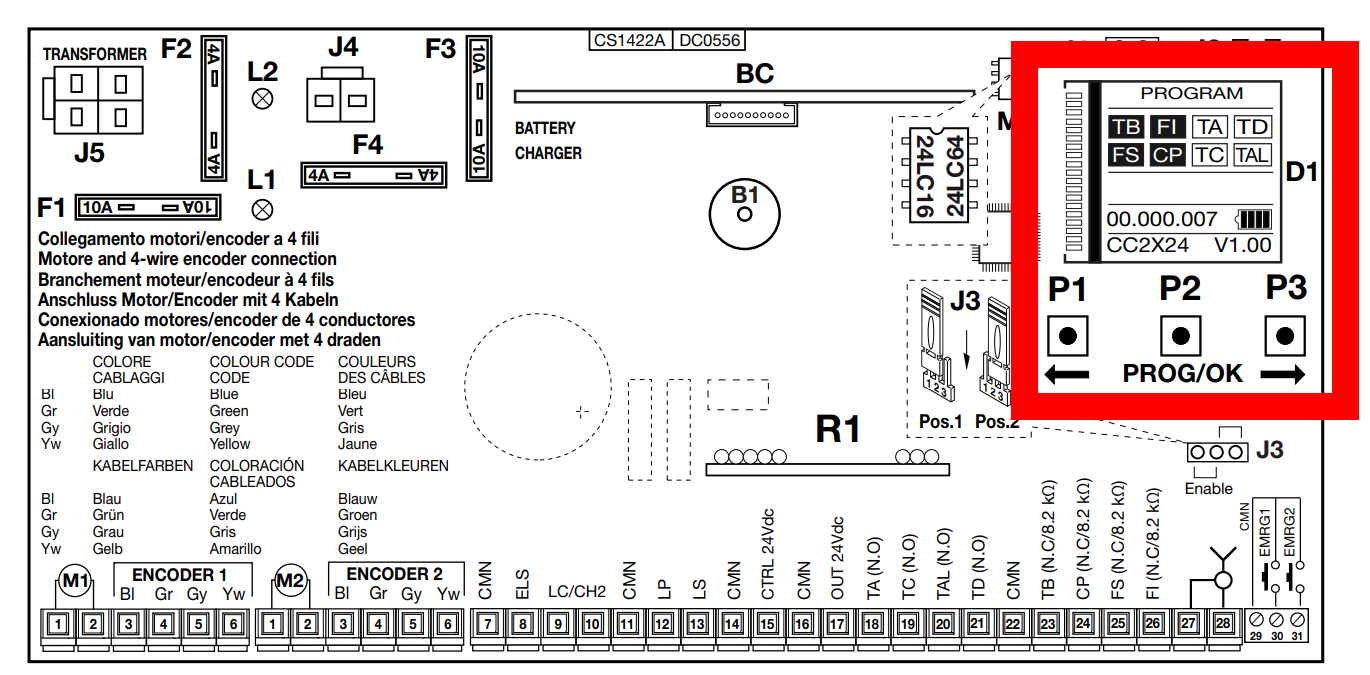
- Press the "-->" button to enter the menu
- Navigate with the "<--" and "-->" keys until you reach the "Radio codes" section and press "PROG/OK"
- Navigate with the "<--" and "-->" keys until you reach the "Memorise" section and press "PROG/OK"
- The writing "Activation 1" will be shown on the display
- On the app, press the "Send opening signal" button
- The writing "Activation 2" will be shown on the display
- On the app, press the "Send opening signal" button again
- The words "Code memorised" will flash on the display
SLX Series
Was this guide helpful?
Thanks for your feedback!
This guide in other languages: Italiano Deutsch Français Español