To complete the copy, follow the procedure as indicated
- Start copying until the "Check operation" screen
- Press the menu button at the top right to enter manual recording as in the image below
- Move the slider higher than 4 seconds

- Press the SW1 button together with the SW2 button on the receiver once, a green LED will light up to confirm the signal learning phase.
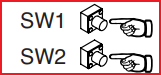
- On the remote control, press the two buttons at the top of the remote control at the same time until the LED on the control unit remains lit.
- Press the " Send opening signal" button on the app. The LED starts flashing again
Wait for the LED to turn off (or wait 60 seconds)