To complete the copy follow the procedure as indicated
- Start copying until the " Verify Operation " screen appears.
- Press the menu button on the top right to enter manual recording as in the image below
- Move the slider above 6 seconds

- On the control unit, press the P1 button for 1 second , the LED lights up
- CH1 LED flashing = receiver learning on channel 1;
- CH2 LED flashing = receiver learning on channel 2;
Note: Press the P1 button again for 1 second to switch between channel 1 and 2.
If there are cables connected to terminals 3 and 5 on the receiver, you will have to operate on channel 1
If they are connected to 6 and 7 you will have to operate on channel 2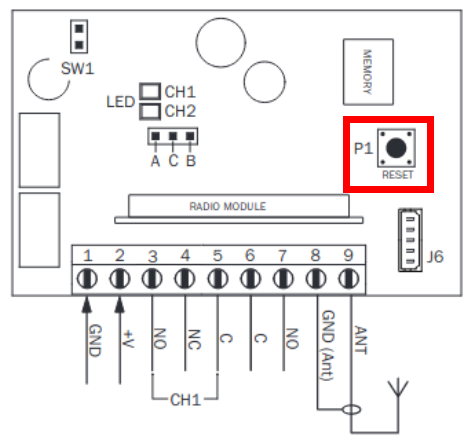
- On the app, press the Transmit opening signal button and wait 10 seconds, the LED remains on for about a second to indicate correct memorization
- Wait until the LED turns off completely