To complete the copy, follow the procedure as indicated
- Start copying until the "Check Operation" screen
- Press the menu key at the top right to enter manual recording as shown in the image below
- Move the slider above 4 seconds

- To copy the "Total opening" button, move the black jumper (see photo) to position J6 (blue)
- Press the LEARN key (highlighted in red) the LED will start flashing and then press in the app "Transmit opening signal"
[ If the jumpers JP1 , JP2 and JP3 were arranged differently, the procedure remains the same ]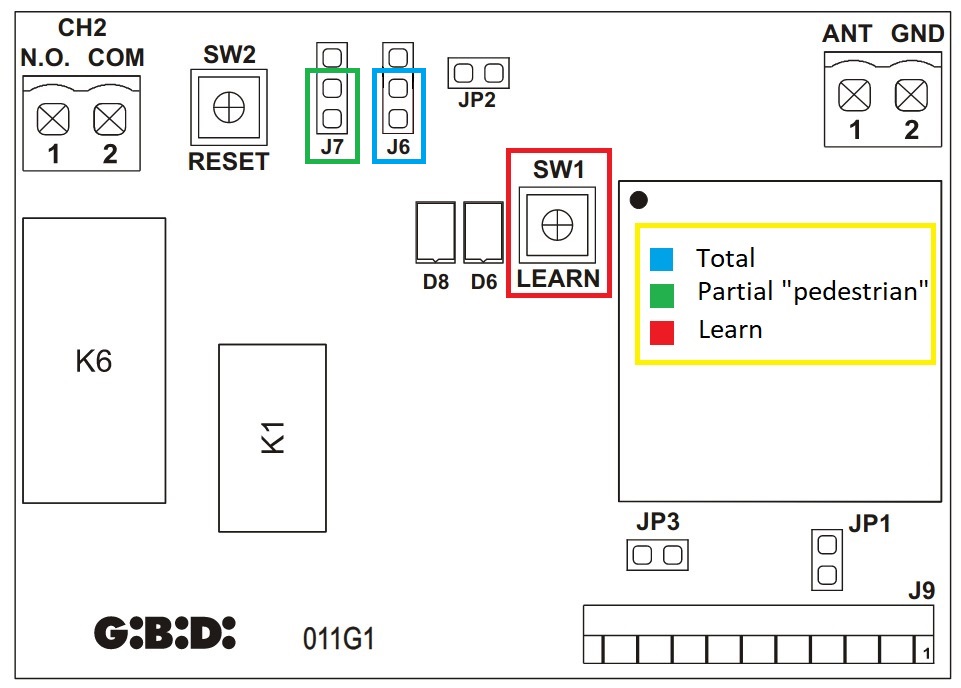
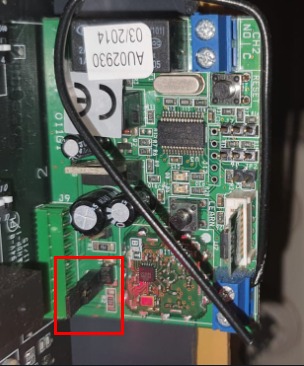
- To copy the "Partial opening" key, move the black jumper (see photo) to position J7 (green)
- Press the LEARN key (highlighted in red) the LED will start flashing and then press in the app "Transmit opening signal"
- Return the jumper to its original position (see photo), the copy is complete