Copy procedure:
- Start copying until you reach the " Verify Operation " screen.
- Press the menu button at the top right to enter manual recording as shown in the image below
- Move the slider above 5 seconds

- On the control unit, press the " Prog " button for 2 seconds, the LED lights up
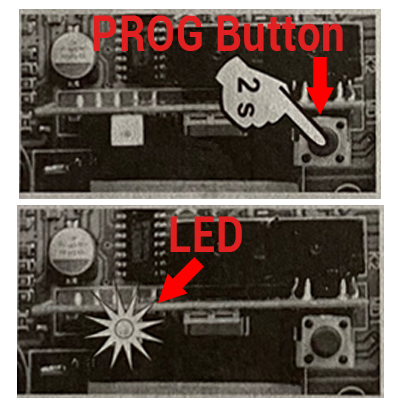
- Place ONLY about 10cm from the receiver
- On the application, press the " Transmit opening signal " button and wait 10 seconds holding the SOLO still in position
- While waiting the LED flashes
- Wait 2 minutes for the receiver to exit programming mode
- Press the " Next " button at the bottom and test the opening using the " Open/Close " button (press several times, waiting 10 seconds between each press)
If this fails, repeat the procedure by increasing the transmission time in step 3 (it is not necessary to repeat the copy, just press the three dots in the top right again)