- Start copying until the "Check Operation" screen
- Press the menu key at the top right to enter manual recording as in the image below
- Move the upper slider to 4 seconds

- Press the P1 key inside the wall receiver, the CH1 LED will light up
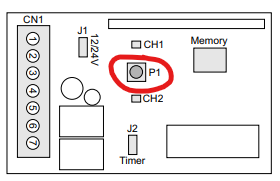
- Press "transmit opening signal" in the app. The CH1 LED will flash 2 times to confirm
successful memorization - press P1 twice to exit programming mode.
SIGN BOX
Was this guide helpful?
Thanks for your feedback!