To complete the copy, follow the procedure as indicated
- Start copying until the "Check Operation" screen
- Press the menu key at the top right to enter manual recording as in the image below
- Move the upper slider to 4 seconds

- Press the "UP " key to select the desired language and confirm by pressing "OK"
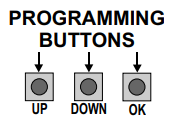
- Press the "UP" key again until you get the "TRANSMITTERS" choice on the display and press "OK" , the wording "START" will appear on the screen, press "OK" again
- At this point "PRESS BUTTON" will appear on the display, press "Send opening signal" in the app
- "STORED" will appear on the display to confirm successful copying