To complete the copy, follow the procedure as indicated
- Start copying until the "Check operation" screen
- Press the menu button at the top right to enter manual recording as in the image below
- Move the slider higher than 4 seconds

- On the receiver locate:
- The display. indicated in red
- The " C ", " Up ", " Down " keys, indicated in blue
- The memory card, indicated in green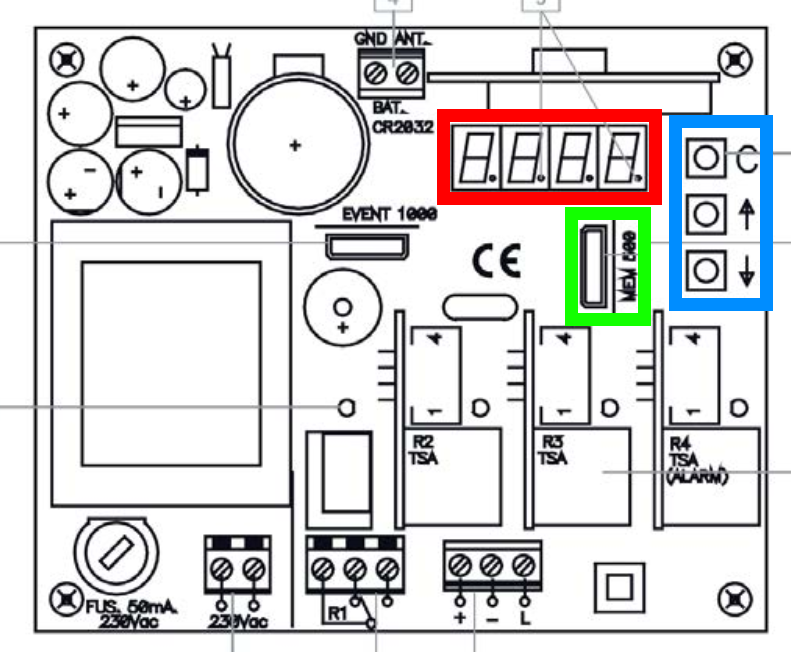
- On the receiver press the " C " key
- Using the " Up " and " Down " keys, enter the password indicated on the memory card
The " Up " key increases the current number
The " Down " key changes the number you are editing
Once you have entered your password, press the " C " key - Select " MOD1 " mode and press " C "
- When the display shows " 001 " Press " C "
- Using the arrows, select a free memory position; if the position is free, a dot is not indicated to the right of the number (C should NOT be pressed after this step)
- Place SOLO in front of the receiver
- In the app, press the Transmit opening signal button. Wait about a minute for the receiver to exit memorization mode.
- In the app, press " Next " at the bottom and carry out an opening test using the " Open/Close " button
- If the procedure fails, try again by increasing the transmission time in step number 3