Get to the screen where you are asked to press the button on the control unit.
On the control unit, check that the display shows -, otherwise press the menu key until you reach -
press the DOWN (RADIO) key for at least 2 seconds, until the message rad appears on the display
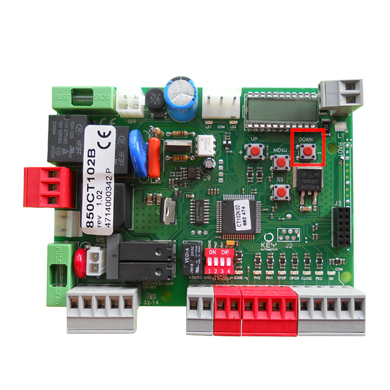
Press the DOWN (RADIO) button again, the KEY LED will emit 1 flash
Within 7 seconds on the app, press the button on the screen
If the procedure is successful, the KEY LED remains on steady for 3 seconds.
CT102 24
Was this guide helpful?
Thanks for your feedback!