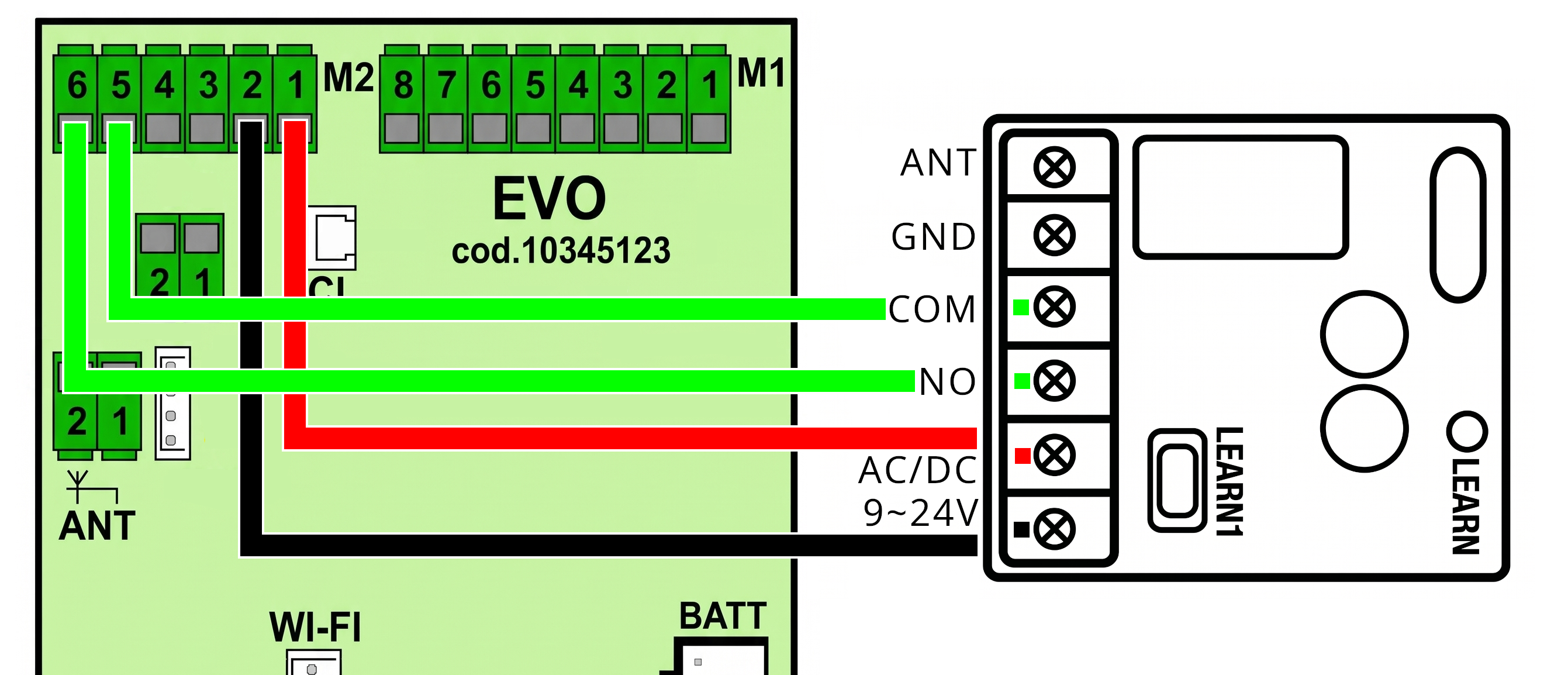
Attention: Disconnect the power supply from the control board before starting any wiring. Every existing cable must be left connected, and if the SOLO KIT connection uses the same terminal as other wires, you must add the new cables to those already present in the same terminal.
The installation of the SOLO KIT may require some adjustments regarding the control unit settings. If, after connection, the SOLO KIT does not follow the expected behavior or suddenly stops working after the garage has been closed for a few minutes, follow these instructions:
Accessing the main menu
From the idle state (Stand-by), simultaneously press and hold the START and STOP buttons until the display shows the first menu item ASEt.
Entering the FUNC menu (Operating log)
From the ASEt screen, press START and STOP simultaneously and briefly to scroll through the subsequent menus (LrAd and then FUnC).
When you see FUnC, long-press STOP to enter the menu and view the parameters.
Setting input M2-6 as START
Use the START button (short presses) to scroll through the parameter list until IPrO (Programmable input type) is displayed.
Long-press STOP to select it.
Use the START button to change the value by scrolling until you read Star (Start function).
Long-press STOP to confirm and save the value.
Choosing the desired Step-by-Step logic
Now scroll again using the START button to the parameter StAr (START command operation).
Long-press STOP to select it.
Use START to select your preferred step-by-step behavior among these options:
2 = Open / Close
3 = Open / Stop / Close (Recommended)
4 = Open / Stop / Close / Stop
Long-press STOP to confirm.
Disabling Energy Saving
Use the START button again to scroll to the ENrG parameter (Energy saving mode).
Long-press STOP to select it.
Press START until the value oFF (Disabled) is displayed.
Long-press STOP to confirm.
Exiting and saving
To exit the setup mode, simultaneously press and hold the START and STOP buttons until you return to the normal display, or simply wait a few minutes and the board will automatically return to Standard mode (Stand-by).