Follow the procedure indicated to complete the copy
- Start copying until the "Verify Operation" screen appears
- Make sure the gate/garage is closed and any warning lights are off
- Press the menu button on the top right to enter manual recording as in the image below
- Move the slider above 4 seconds

- On the control unit, press the "LERN" button for 4 seconds, the red LED lights up, release the button
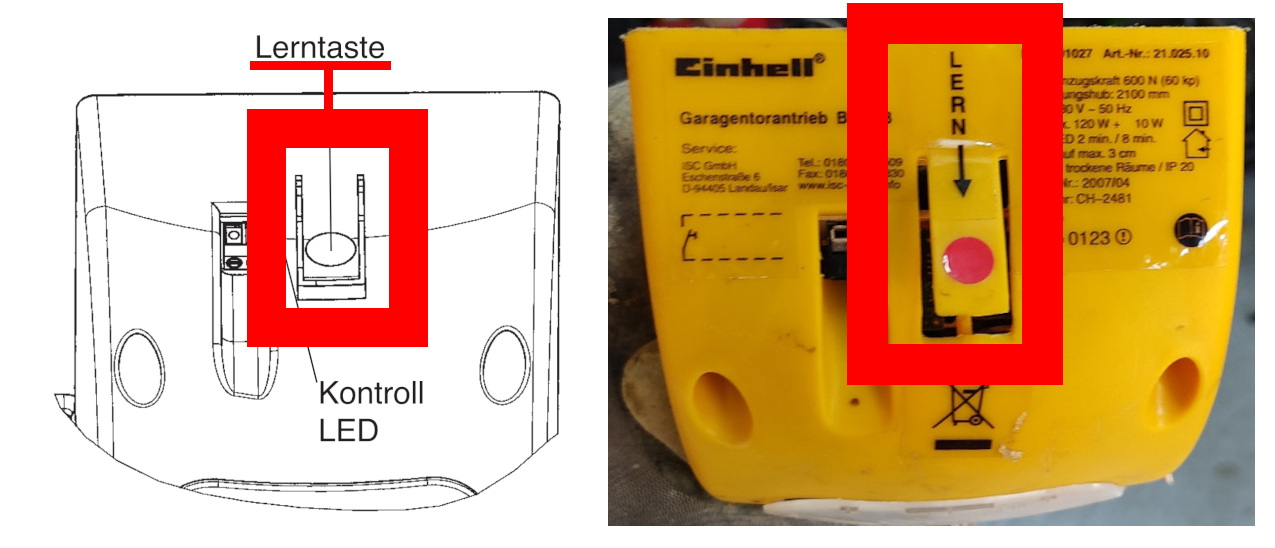
- Press the " Transmit opening signal " button in the app and wait 10 seconds, the LED should turn off
- Press the " Next " button at the bottom of the app and test the copy operation
Note: A maximum of 3 hand-held transmitters can be saved on the drive. The transmission code remains in the drive until a new one is programmed. In the event of a power failure, the transmission code is not lost.
In the event of a malfunction, pull the power plug and repeat the commissioning.